BOAT Mobile
BOAT Mobile
Making product merchandising fast and accessible.
Making product merchandising fast and accessible.
ROLE
UX/UI Designer
UX Researcher
ASPECTS
Product lookup and data editing
Image capture, upload, and management
TIMELINE
Q2 2025
DELIVERABLES
Figma wireframes & prototypes
TEAM
Drew Olson
Product Manager
Adam Coleman
Full-Stack Development
Tory Swensen
Frontend Development
Paul Fastner
Backend Development
CONTEXT
Leading the charge from desktop to mobile
Leading the charge from desktop to mobile
BOAT is a desktop PIM software product developed by FurnitureDealer.Net that allows furniture retailers to manage and update product data used on their retail websites.
In Q2 of 2025, leadership identified an opportunity to expand BOAT’s impact by introducing a mobile app version of the application specialized for capturing and uploading product images to the PIM database.
The introduction of the mobile app was projected to:
Increase BOAT’s active user base
Increase its overall engagement stats
Improve client perception of the product’s value
I led end-to-end UX/UI design for the entire mobile app, shaping its information architecture, user flows, visual design, and prototypes while collaborating with stakeholders and engineering from concept through development.
BOAT is a desktop PIM software product developed by FurnitureDealer.Net that allows furniture retailers to manage and update product data used on their retail websites.
In Q2 of 2025, leadership identified an opportunity to expand BOAT’s impact by introducing a mobile app version of the application specialized for capturing and uploading product images to the PIM database.
The introduction of the mobile app was projected to:
Increase BOAT’s active user base
Increase its overall engagement stats
Improve client perception of the product’s value
I led end-to-end UX/UI design for the entire mobile app, shaping its information architecture, user flows, visual design, and prototypes while collaborating with stakeholders and engineering from concept through development.
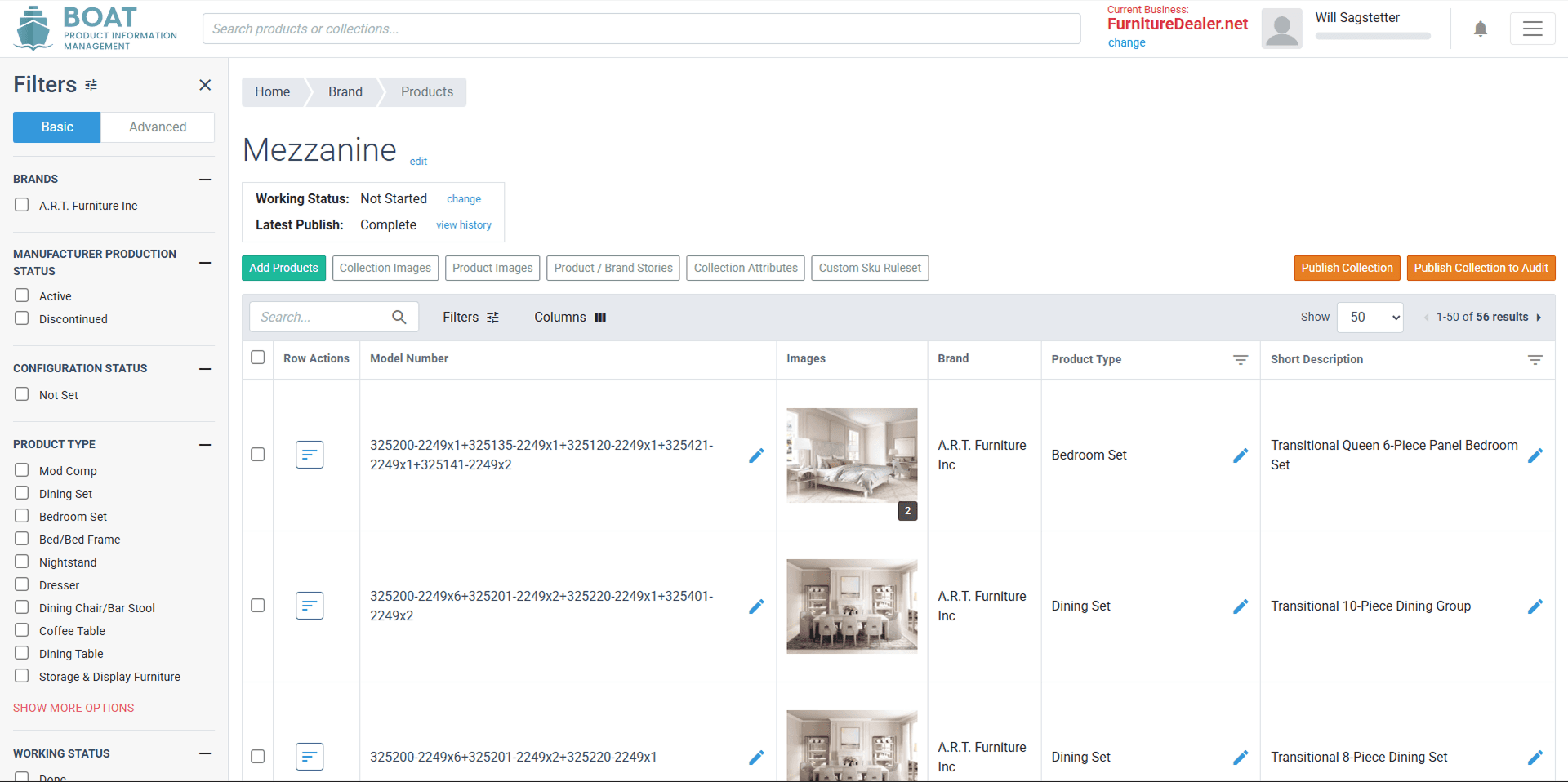

Screenshot of BOAT desktop product.
Screenshot of BOAT desktop product.
PROBLEM
Retail staff are always on the move—our tools need to move with them
Retail staff are always on the move—our tools need to move with them
BOAT was originally built as a desktop application designed for long, stationary work sessions—an immediate disconnect for furniture retail staff, who are its primary users. Their day-to-day workflow is defined by constant movement, rapid task-switching, and the need to prioritize customers at a moment’s notice. A tool that requires extended, focused desk time simply doesn’t align with how they work.
As a result, BOAT became deprioritized in daily store routines, and important PIM updates weren’t happening as frequently as they should've been.
It was clear that BOAT needed a mobile solution so it could integrate more naturally into the real-world environment of its users.
BOAT was originally built as a desktop application designed for long, stationary work sessions—an immediate disconnect for furniture retail staff, who are its primary users. Their day-to-day workflow is defined by constant movement, rapid task-switching, and the need to prioritize customers at a moment’s notice. A tool that requires extended, focused desk time simply doesn’t align with how they work.
As a result, BOAT became deprioritized in daily store routines, and important PIM updates weren’t happening as frequently as they should've been.
It was clear that BOAT needed a mobile solution so it could integrate more naturally into the real-world environment of its users.
PROJECT GOALS & SCOPE
Honoring the original while optimizing for mobile
Honoring the original while optimizing for mobile
To guide development and control scope we established a focused set of goals to adhere to:
To guide development and control scope we established a focused set of goals to adhere to:
Keep it lightweight, fast, and accessible
Keep it lightweight, fast, and accessible
Given that our target users skew older, are less tech-savvy, and work in a fluid, interruption-heavy environment, the app needed to be as straightforward and accessible as possible to support strong adoption and sustained use.
Given that our target users skew older, are less tech-savvy, and work in a fluid, interruption-heavy environment, the app needed to be as straightforward and accessible as possible to support strong adoption and sustained use.
Zero in on mobile-affinitive workflows
Zero in on mobile-affinitive workflows
Only a handful of BOAT’s workflows truly shine when translated to mobile, so to keep the app lightweight and focused, we chose to include only the features that are faster and more convenient to complete on a phone (i.e., capturing, uploading, and managing images).
Only a handful of BOAT’s workflows truly shine when translated to mobile, so to keep the app lightweight and focused, we chose to include only the features that are faster and more convenient to complete on a phone (i.e., capturing, uploading, and managing images).
Improve visuals while maintaining cross-platform consistency
Improve visuals while maintaining cross-platform consistency
Originally built in 2019, BOAT’s desktop UI needed a visual refresh for mobile. However, that update had to be balanced with preserving enough of the desktop’s visual and behavioral patterns to keep the experience familiar for existing users and clearly part of the same software ecosystem.
Originally built in 2019, BOAT’s desktop UI needed a visual refresh for mobile. However, that update had to be balanced with preserving enough of the desktop’s visual and behavioral patterns to keep the experience familiar for existing users and clearly part of the same software ecosystem.
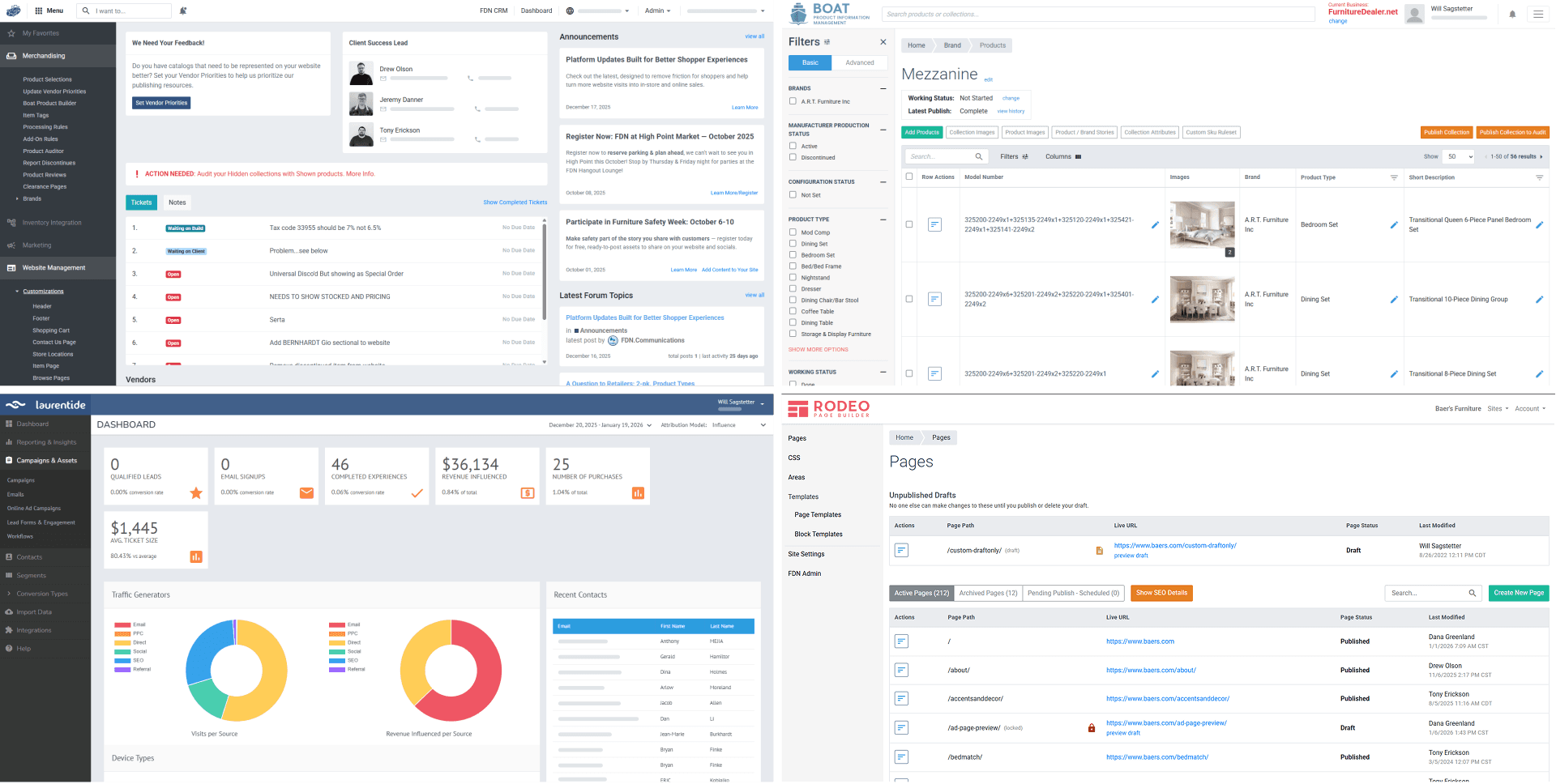

Desktop products across FDN's portfolio.
Desktop products across FDN's portfolio.
CHALLENGES & CONSTRAINTS
Pushing through practical and technical limitations
Pushing through practical and technical limitations
The project came with several challenges and constraints that I needed to account for, pushing me to balance technical feasibility with user needs and make strategic design decisions at every level:
The project came with several challenges and constraints that I needed to account for, pushing me to balance technical feasibility with user needs and make strategic design decisions at every level:
Technical constraints of PWAs
Technical constraints of PWAs
The mobile app was built as a PWA (Progressive Web App), which introduced several technical constraints not faced by native mobile apps, including:
The mobile app was built as a PWA (Progressive Web App), which introduced several technical constraints not faced by native mobile apps, including:
Inability to distribute through app stores
Limited offline functionality and storage capacity
Slower loading and processing times
No push notification support (especially on iOS)
Restricted access to advanced camera features
Inability to distribute through app stores
Limited offline functionality and storage capacity
Slower loading and processing times
No push notification support (especially on iOS)
Restricted access to advanced camera features
Low digital literacy of target users
Low digital literacy of target users
To accommodate our target users—who have limited digital literacy skills and a low tolerance for UX friction—the app needed to be grounded in hyper-accessible design practices.
To accommodate our target users—who have limited digital literacy skills and a low tolerance for UX friction—the app needed to be grounded in hyper-accessible design practices.
Limited engineering resources
Limited engineering resources
With limited resources, the engineering team often favored solutions that prioritized efficiency over the user experience. I frequently had to advocate for our target users, pushing back on overly economical shortcuts and collaborating to find more balanced alternatives that delivered a sufficient user experience.
With limited resources, the engineering team often favored solutions that prioritized efficiency over the user experience. I frequently had to advocate for our target users, pushing back on overly economical shortcuts and collaborating to find more balanced alternatives that delivered a sufficient user experience.
RESEARCH & DESIGN PROCESS
Research, refine, and roll with the punches
Research, refine, and roll with the punches
Research & Planning
Research & Planning
To ensure my design process was grounded in real business goals, user needs, and technical constraints, I began the project with a focused research and planning phase. I created a research plan that outlined the key topics and questions I needed to explore and the methods I would use to gather that information.
I met with stakeholders to establish the problem space, define the app’s feature set, and identify which pieces of the desktop product needed to be translated to mobile. During these discussions, we also noted any major technical constraints and settled on strategies to navigate them.
I also consulted with SMEs and conducted an exploratory review of the desktop product to form a high-level understanding of BOAT’s broader functionality, giving me the context needed to translate the source experience effectively to mobile.
To ensure my design process was grounded in real business goals, user needs, and technical constraints, I began the project with a focused research and planning phase. I created a research plan that outlined the key topics and questions I needed to explore and the methods I would use to gather that information.
I met with stakeholders to establish the problem space, define the app’s feature set, and identify which pieces of the desktop product needed to be translated to mobile. During these discussions, we also noted any major technical constraints and settled on strategies to navigate them.
I also consulted with SMEs and conducted an exploratory review of the desktop product to form a high-level understanding of BOAT’s broader functionality, giving me the context needed to translate the source experience effectively to mobile.


Problem mapping, user flow diagrams, and high-level desktop IA breakdown.
Problem mapping, user flow diagrams, and high-level desktop IA breakdown.
To better understand our target users, I conducted desk research, ethnographic observation, and proxy interviews to learn more about their workflows and needs. From this, I identified user goals, pain points, and developed user personas and other materials to guide the design process.
To better understand our target users, I conducted desk research, ethnographic observation, and proxy interviews to learn more about their workflows and needs. From this, I identified user goals, pain points, and developed user personas and other materials to guide the design process.

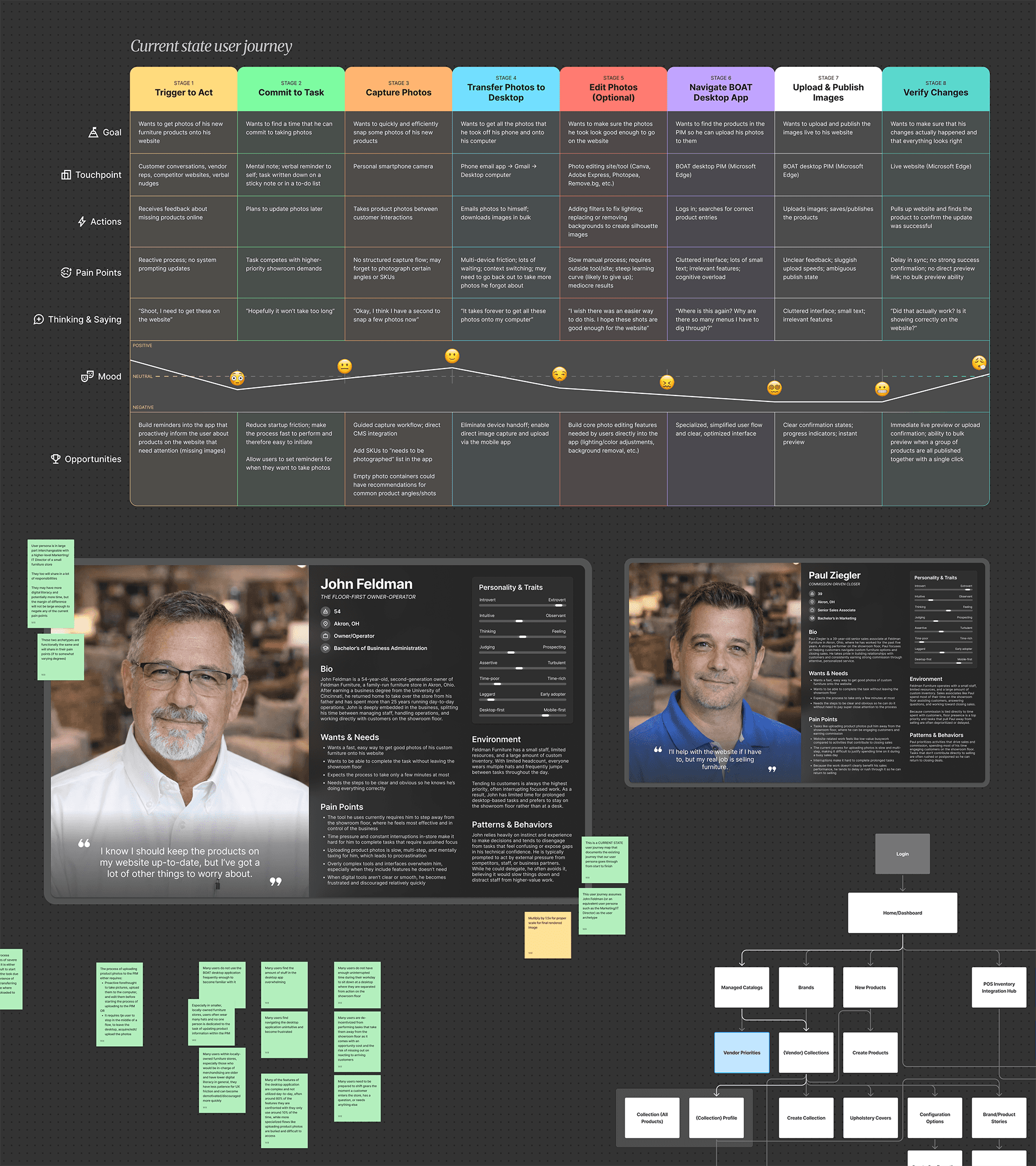
User personas, archetypes, and user journey maps.
User personas, archetypes, and user journey maps.
Finally, I collaborated with the product team to define post-launch KPIs and established a plan for analytics tracking to support rollout evaluation.
Finally, I collaborated with the product team to define post-launch KPIs and established a plan for analytics tracking to support rollout evaluation.
Initial Concepting & Wireframing
Initial Concepting & Wireframing
After completing my research, I moved into early UX concepting and exploration. This phase involved defining the app’s information architecture and creating low-fidelity wireframes to validate key flow concepts with the product team.
The initial wireframes modeled core app flows including:
Creating a new product SKU
Looking up an existing SKU
Editing basic SKU information
Capturing and uploading product photos
Applying metadata tags to photos
Editing and reordering photos
Viewing, adding, and managing user accounts
I also designed fallback flows for SKU creation and lookup to handle edge cases—such as attempting to create a SKU that already exists or searching for one that doesn’t—to ensure a smooth user experience.
After completing my research, I moved into early UX concepting and exploration. This phase involved defining the app’s information architecture and creating low-fidelity wireframes to validate key flow concepts with the product team.
The initial wireframes modeled core app flows including:
Creating a new product SKU
Looking up an existing SKU
Editing basic SKU information
Capturing and uploading product photos
Applying metadata tags to photos
Editing and reordering photos
Viewing, adding, and managing user accounts
I also designed fallback flows for SKU creation and lookup to handle edge cases—such as attempting to create a SKU that already exists or searching for one that doesn’t—to ensure a smooth user experience.
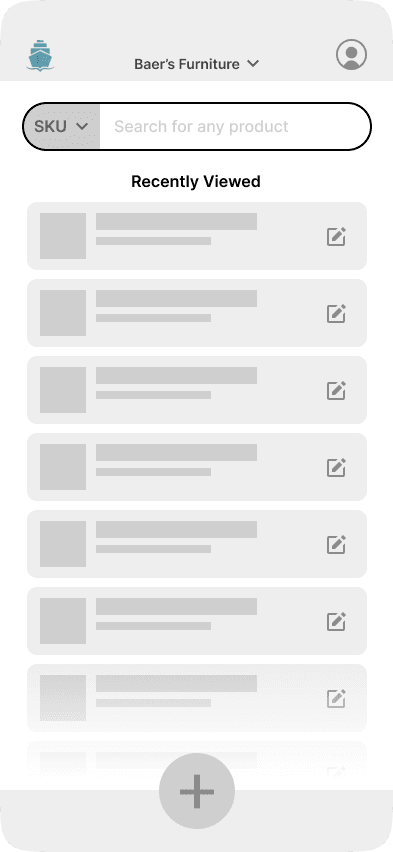


Initial UX wireframe iterations.
Initial UX wireframe iterations.
After a few iteration cycles based on stakeholder feedback, where I addressed feasibility concerns, engineering constraints, and a previously miscommunicated flow, the wireframe was formally approved for prototyping and high-fidelity visual design.
After a few iteration cycles based on stakeholder feedback, where I addressed feasibility concerns, engineering constraints, and a previously miscommunicated flow, the wireframe was formally approved for prototyping and high-fidelity visual design.
High-Fidelity UI Design & Prototype Development
High-Fidelity UI Design & Prototype Development
At this stage, I defined the app's final visual language and documented it in a style guide developed alongside the build, rooted in the desktop experience's existing patterns and updated for mobile.
At this stage, I defined the app's final visual language and documented it in a style guide developed alongside the build, rooted in the desktop experience's existing patterns and updated for mobile.


Style guide outlining typography, layout, colors, and more.
Style guide outlining typography, layout, colors, and more.
Typography, color, spacing, layout, reusable components, and microcopy conventions were all established here to ensure clarity and consistency throughout the app.
Typography, color, spacing, layout, reusable components, and microcopy conventions were all established here to ensure clarity and consistency throughout the app.


Core UI component kit.
Core UI component kit.
Throughout the design process, I evaluated the style guide against WCAG accessibility standards, including color contrast, text legibility, and tap target sizing, and content stress-tested components to ensure they could accommodate SKU strings of varying lengths, including edge-case extremes, without breaking or compromising layout or readability.
Throughout the design process, I evaluated the style guide against WCAG accessibility standards, including color contrast, text legibility, and tap target sizing, and content stress-tested components to ensure they could accommodate SKU strings of varying lengths, including edge-case extremes, without breaking or compromising layout or readability.
Responsive SKU List Item component design.
Responsive SKU List Item component design.
After gathering team feedback and securing approval, I handed the design off to engineering for implementation of the MVP.
After gathering team feedback and securing approval, I handed the design off to engineering for implementation of the MVP.
QA Support & UX Problem-Solving During MVP Build
QA Support & UX Problem-Solving During MVP Build
As engineering built the app, I remained closely involved in the development process by providing ongoing QA support, identifying and documenting bugs, and collaborating with engineers to resolve implementation questions.
I supplied additional UX/UI screens as needed, including guidance on default and error states, breakpoint variations, and edge cases, to close any gaps during the build. This continuous involvement helped ensure the final product stayed in line with both user needs and business goals.
As engineering built the app, I remained closely involved in the development process by providing ongoing QA support, identifying and documenting bugs, and collaborating with engineers to resolve implementation questions.
I supplied additional UX/UI screens as needed, including guidance on default and error states, breakpoint variations, and edge cases, to close any gaps during the build. This continuous involvement helped ensure the final product stayed in line with both user needs and business goals.

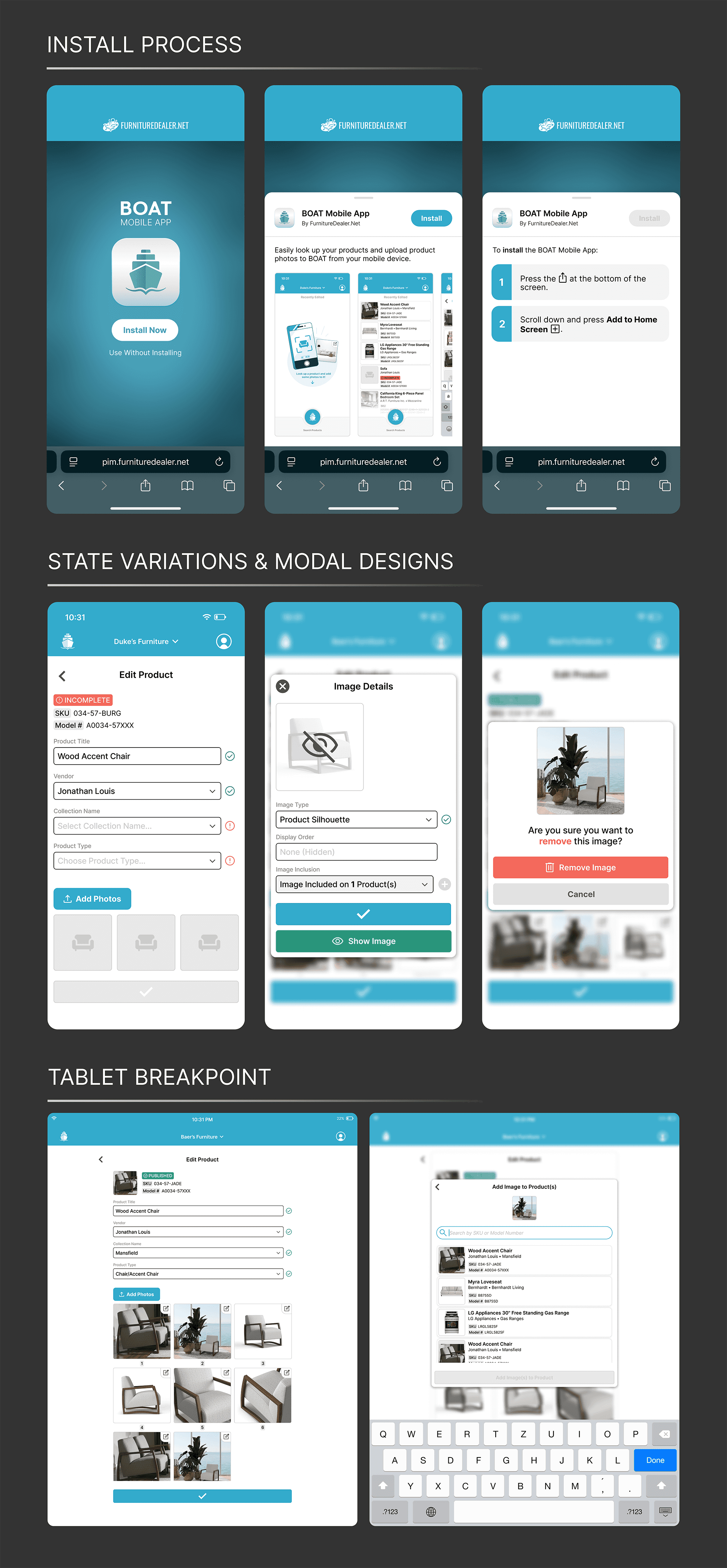
Install process, state variation, and breakpoint screens for MVP build.
Install process, state variation, and breakpoint screens for MVP build.
Internal Usability Testing & UX Improvements
Internal Usability Testing & UX Improvements
After the MVP was complete, I led internal moderated usability testing with users of varying familiarity with BOAT as a cost-effective way to quickly gather early feedback, identify major usability issues, and de-risk the experience ahead of external testing. This approach would allow later testing with target users to focus on collecting higher-value, workflow-specific insights rather than foundational usability concerns.
For testing, participants were asked to think aloud as they completed task-based flows without guidance, allowing us to assess intuitiveness, feature discoverability, and any potential UX snags in core user flows.
I captured observations, synthesized findings, partnered with the PM to define improvements based on those findings, and shared recommendations with engineering to address UX issues uncovered during testing.
After the MVP was complete, I led internal moderated usability testing with users of varying familiarity with BOAT as a cost-effective way to quickly gather early feedback, identify major usability issues, and de-risk the experience ahead of external testing. This approach would allow later testing with target users to focus on collecting higher-value, workflow-specific insights rather than foundational usability concerns.
For testing, participants were asked to think aloud as they completed task-based flows without guidance, allowing us to assess intuitiveness, feature discoverability, and any potential UX snags in core user flows.
I captured observations, synthesized findings, partnered with the PM to define improvements based on those findings, and shared recommendations with engineering to address UX issues uncovered during testing.


Notable findings from the first round of usability testing.
Notable findings from the first round of usability testing.
For issues requiring design revisions, I provided updated deliverables to support a second implementation pass.
For issues requiring design revisions, I provided updated deliverables to support a second implementation pass.


UX/UI revisions based on findings from usability testing.
UX/UI revisions based on findings from usability testing.
External Usability Testing & Final Pre-Launch Improvements
External Usability Testing & Final Pre-Launch Improvements
Once engineering wrapped up the build improvements, my next step was to collaborate with the client account team to organize and execute in-person contextual inquiry and moderated usability testing with select clients in our local market who closely matched our target user profile.
This external testing would have delivered focused, high-fidelity feedback on the MVP to inform final refinements prior to the beta release.
At this point, my involvement in the project was put on hold as my expertise was needed on other projects.
Once engineering wrapped up the build improvements, my next step was to collaborate with the client account team to organize and execute in-person contextual inquiry and moderated usability testing with select clients in our local market who closely matched our target user profile.
This external testing would have delivered focused, high-fidelity feedback on the MVP to inform final refinements prior to the beta release.
At this point, my involvement in the project was put on hold as my expertise was needed on other projects.
FINAL DELIVERABLES
Pixels, prototypes, and a handoff-ready design
Pixels, prototypes, and a handoff-ready design
The final deliverables included an interactive high-fidelity Figma prototype, UI component kit, style guide, and supporting documentation covering state variations, edge cases, and breakpoint specs—all handed off to engineering as a complete foundation for building the production app.
The final deliverables included an interactive high-fidelity Figma prototype, UI component kit, style guide, and supporting documentation covering state variations, edge cases, and breakpoint specs—all handed off to engineering as a complete foundation for building the production app.
REFLECTION & OUTCOMES
Think big, compromise smart, measure everything
Think big, compromise smart, measure everything
If I were given the opportunity to continue work on this project, my next steps would’ve been completing the field research I had begun coordinating with the client account team, synthesizing findings, and aligning with engineering on a final round of improvements before beta release.
From there, I would have supported the product rollout, helped establish the systems needed to track against the KPIs we defined earlier in the project, and then actively collected and analyzed that data to assess the product's efficacy and communicate findings to stakeholders.
Metrics used to gauge success would include:
Task completion rate and error rate
Measured and self-reported time-on-task comparisons
Click count comparisons (mobile vs. desktop)
Session length, frequency, and engagement comparisons post-rollout
Upload volume over time (mobile vs. desktop)
Observable growth in active user base
Onboarding drop-off rate
Post-task satisfaction scores (CSAT and SUS)
Before and after NPS scores
Contextual inquiry observations and client account team feedback
Crash and bug report frequency
If I were given the opportunity to continue work on this project, my next steps would’ve been completing the field research I had begun coordinating with the client account team, synthesizing findings, and aligning with engineering on a final round of improvements before beta release.
From there, I would have supported the product rollout, helped establish the systems needed to track against the KPIs we defined earlier in the project, and then actively collected and analyzed that data to assess the product's efficacy and communicate findings to stakeholders.
Metrics used to gauge success would include:
Task completion rate and error rate
Measured and self-reported time-on-task comparisons
Click count comparisons (mobile vs. desktop)
Session length, frequency, and engagement comparisons post-rollout
Upload volume over time (mobile vs. desktop)
Observable growth in active user base
Onboarding drop-off rate
Post-task satisfaction scores (CSAT and SUS)
Before and after NPS scores
Contextual inquiry observations and client account team feedback
Crash and bug report frequency
Reflection
Reflection
This project taught me how to practically balance the ideal user experience against technical limitations and business objectives. Thinking big (as I often do) is something I consider a genuine strength of mine, but I'm also aware that it can become a liability if I let my ambitions get in the way of arriving at a realistic solution that actually works for the engineers, the budget, and the business context.
The project was a constant exercise in knowing when to advocate hard for features that were critical to the product's success and when to recognize something as just an attractive nice-to-have that wouldn't move the needle enough to justify the implementation cost. Learning to pressure-test those calls by cross-referencing business objectives with user research data, design heuristics, and frameworks like the Kano Model became one of the most valuable habits I took away from this project.
This project taught me how to practically balance the ideal user experience against technical limitations and business objectives. Thinking big (as I often do) is something I consider a genuine strength of mine, but I'm also aware that it can become a liability if I let my ambitions get in the way of arriving at a realistic solution that actually works for the engineers, the budget, and the business context.
The project was a constant exercise in knowing when to advocate hard for features that were critical to the product's success and when to recognize something as just an attractive nice-to-have that wouldn't move the needle enough to justify the implementation cost. Learning to pressure-test those calls by cross-referencing business objectives with user research data, design heuristics, and frameworks like the Kano Model became one of the most valuable habits I took away from this project.
